Building Klue
TLDR; Built a chrome app that is smart about highlighting your most relevant notes while you browse any website. Give Klue a try on the Chrome Web Store.
I've been a power user of a lot of note-taking apps over the years. Joplin, Obsidian, Apple Notes, Notion, OneNote, OneTab. Honestly, I lost count. The pattern was always the same: save something that feels important, never see it again. Or stumble across it six months later with zero memory of why I saved it.
The apps weren't the problem. They're all well-built. The problem was the moment of friction. I'm deep into a report about UK sub-prime markets, and somewhere in my brain there's a note about 2020 sub-primes I saved months ago. But finding it means stopping everything, opening the app, guessing which tag past-me used (was it something generic like #finance? maybe specific like #primes?), scrolling through pages of stuff. By the time I find it, the connection I was chasing is gone.
I'd been reading about vector search making this kind of "meaning-based" retrieval actually feasible. Transformers.js has been able to run embedding models in the browser for a while now. And LLMs don't require a PhD to set up anymore with the carnival of APIs out there. I wanted to test if I could build something that just worked, so I gave myself a weekend to find out.
Breaking Down the Problem
Before writing any code, I tried to figure out who actually has this problem and what everyone else is building. Turns out, a lot.
The market split
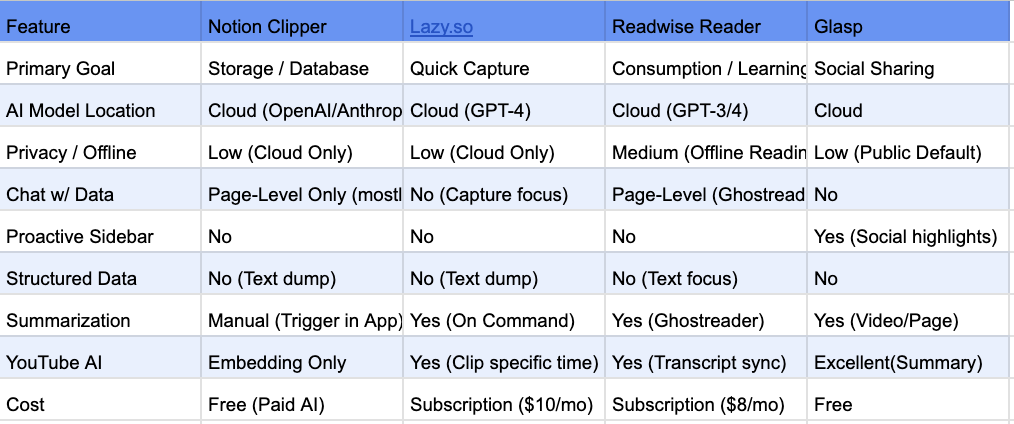
I spent a few days looking at what's out there. The landscape splits roughly two ways.
Storage-focused tools like Obsidian, Notion and Evernote let you build elaborate systems. You can customise everything, which is powerful, but I found myself spending more time organising than actually using my notes. Obsidian's web clipper asks you to pick a vault, set template properties, add web page properties, all before you can save anything. It's very flexible. Also very slow when you just want to clip something quick.
AI-native tools like Readwise get the synthesis part. Readwise's AI integration is clever. You can chat with your articles. Popular tools also now auto-summarise YouTube videos. But everything routes through cloud LLMs, which makes sense for their model but felt uncomfortable for research notes or anything work-related. Your queries, your data, all going to OpenAI's servers.
The gap I saw: everything treats clipping like a library. You go to the tool to find things. Nothing proactively surfaces "hey, you have 3 notes related to what you're reading right now." The intelligence reacts to you instead of working alongside you.
The user personas
I developed three archetypes, not for documentation but more like decision filters for myself, based on my own workflows that I recorded myself doing. Every time I was about to build something, I'd ask: does this actually help one of these people?
-
Deep Diver Researcher. Academic or journalist working on long-form synthesis. Pain: loses the source of quotes. Can't find that one paragraph they swear they saved. The test: can they write a synthesis paper citing 50 pages using only this extension?
-
Frontend Architect. Hobby programmer researching solutions to specific bugs or implementations. Pain: saves code snippets with explanations, can't find them three months later when hitting the same bug. The test: can they solve problems from their own notes faster than re-Googling or asking AI?
-
Avid Hiker. Likes to build mood boards and reference hiking routes to plan for. Pain: screenshots pile up in Downloads. Pinterest is too public. Text-only clippers don't help. The test: can they design a hiking trip itinerary using only the #hiking tag?
These became the lens for every decision. Ghost tags (covered later) shipped because the Deep Diver needed serendipity and the Hobby Programmer needed precision, and it solved for both. Live context in chat shipped because all three personas needed to compose context on the fly without starting the conversation over.
The Setup
I had a weekend to prototype, so I structured my AI-assisted workflows like a pod team, except the team was LLM agents with distinct roles:
- Me (PM): making product decisions, writing specs, filtering everything through the three personas.
Gemini.MD(Orchestrator): reading Linear issues, exploring the codebase, writing technical specs, reviewing code.Claude.MD(Engineer): reading specs, implementing with TDD, checking off boxes, committing code for review.- Advisory skills: a Principal Designer persona for UX critiques, an ML Principal Engineer for architecture advice.
The workflow:

I considered using one agent for everything, but that would have meant settling for worse odds of one-shotting features with okay architecture and okay code. Claude burns through tokens when it thinks and writes code, and quickly runs into the 5-hour usage limits. Gemini has a 1 million token context window, which is useful for larger thinking tasks, and its usage limits are more forgiving.
Design System
Before building anything, I needed to answer: what outcome do I need, what should this feel like for the user, and how do I keep the momentum of browsing without being intrusive?
Design philosophy:
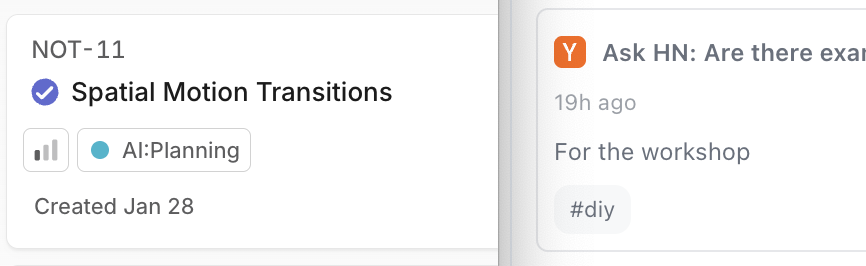
I really liked Linear's "intent driven" philosophy: users don't "view lists," they "act on intents." So not "Bookmarks," but "Read Later." Not "Tags," but "Research Stack."
Why it fit the personas:
- Hobby Programmer: keyboard shortcuts everywhere, compact UI, fast navigation.
- Deep Diver: dense information display, clear visual hierarchy for scanning 50+ notes.
- Avid Hiker: subtle animations, stays out of the way.
Everything shipped with full design tokens documented in DESIGN_SYSTEM.md, which helped make the codebase maintainable.
Solution Architecture
The AI Harness
The personas needed some machine learning infra to help them answer "what connects these notes?". I evaluated three options.
Option 1: Gemini Nano (local). Stable Chrome now has built-in on-device AI. It runs locally, has near-zero latency, and works offline after the first prompt. The catch: it requires a minimum of 22GB storage, 16GB RAM, or a 4GB VRAM GPU, which my laptop barely met. The addressable market doesn't have these specs, and I can't build for hardware most people don't own.
Option 2: Google AI APIs (early preview). Google's preview AI APIs looked promising and had better hardware requirements than Nano, but the API surface changed weekly. Locking the extension into Google's ecosystem with experimental APIs would have meant breaking changes every month.
Option 3: Provider abstraction. Having a single provider also meant a single point of failure, so I built an abstraction layer (popularly called an AI harness today) with pluggable providers. I settled on OpenRouter's free model router for v1. This keeps AI features free with a BYOKey option, and still keeps the door open for Gemini Nano when the ecosystem matures.
class AIHarness {
  async initialize(providerName = 'openrouter') { }
  async sendMessage(text, context, onChunk, onComplete) { }
}
Providers live in ai-harness/providers/: openrouter.js (shipped in v1), gemini.js (placeholder), claude.js (placeholder). Each provider normalises messages, handles streaming, and implements fallback logic. The chat UI doesn't know which provider it's talking to.
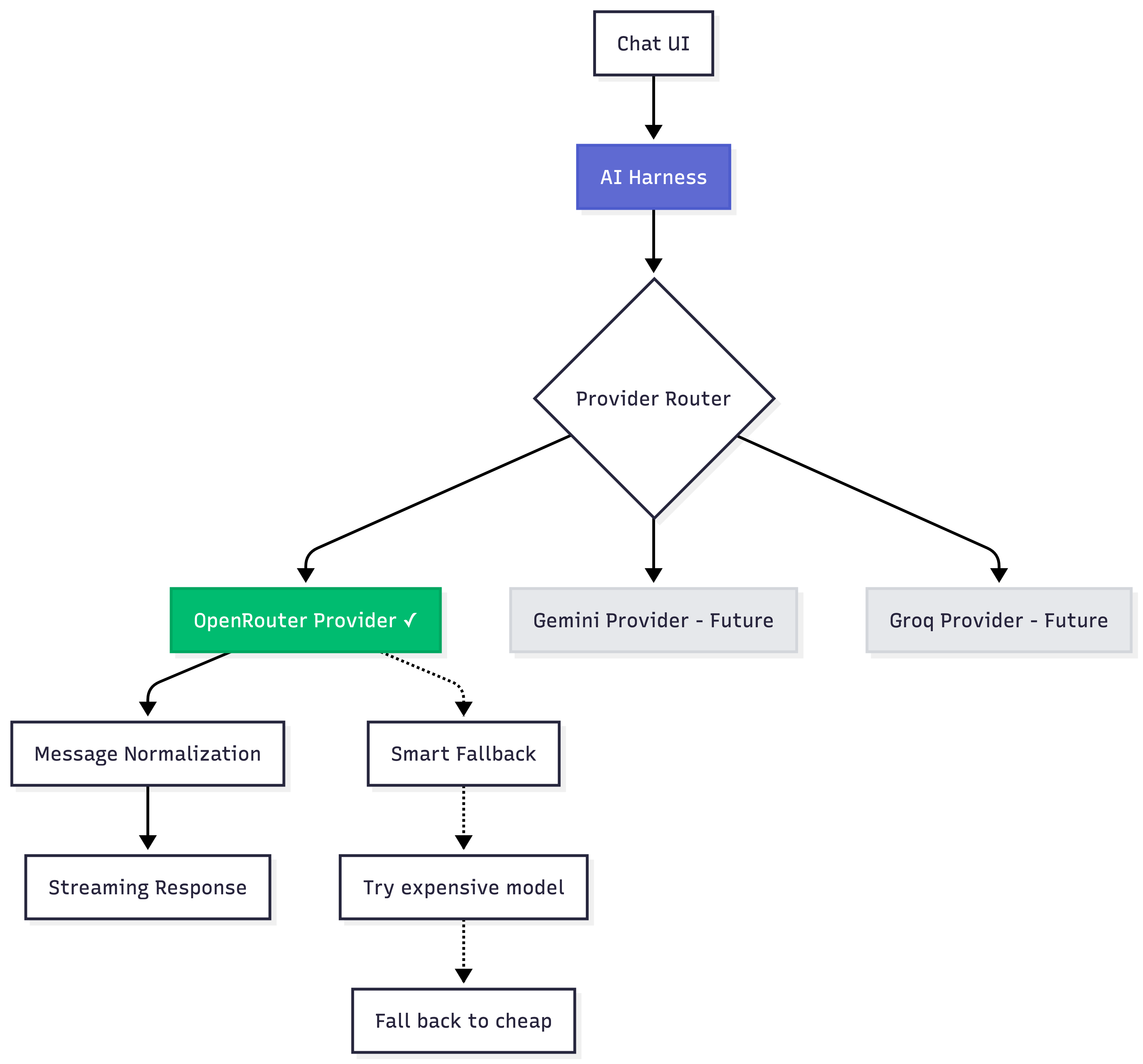
With AI tooling maturing fast in 2025, I was itching to test out eval frameworks, token usage tracking, concept drift monitoring, and orchestration for multi-step agentic loops. But I had to keep it simple. Observability is for scale; v1 is about validating the core loop.
Local RAG Stack
To actively surface relevant notes based on context, we couldn't just send the current page and note contexts to an LLM on most user actions. It's both computationally expensive and slow. The Deep Diver researcher also can't send proprietary work to a cloud LLM.
I needed a local-first, zero-API-calls approach for embeddings. The privacy comes from where the data sits, not from a privacy policy. Your notes should never leave your machine unless you explicitly use chat.
Embedding and clustering
I settled on the classic all-MiniLM-L6-v2 sentence transformer. It turns text into a numerical 'fingerprint' that represents its meaning. Larger model variants (768-dim) were more accurate but 4x bigger. Smaller models (128-dim) were faster but felt too imprecise. 384-dim hit the sweet spot.
Search
For search, I first tried raw cosine similarity, but it couldn't keep up with 1,000+ notes. Then I looked into FAISS (via WASM), but it was too bulky to load quickly in a browser. I eventually found Orama, which gave hybrid search (text + vector) with a tiny footprint and IndexedDB persistence out of the box.
I added a queue to process one note at a time. The early versions let embedding requests run concurrently, and the Chrome service worker kept crashing after indexing 50 notes. The queue is slower, but stable for v1.
The final stack:
- Transformers.js runs
Xenova/all-MiniLM-L6-v2in the browser (384-dimensional embeddings, 25MB model). - Orama is the in-memory vector database with hybrid search (keyword + semantic).
- IndexedDB is the persistence layer, which bypasses chrome.storage's 5MB limit.
- A service worker handles a sequential task queue to prevent memory spikes.
UX: The Context Surfacing Problem
While setting up the backend, I was also trying to address the core UX problem: how do users tell the app what context to use? It took a few tries to get this right.
Iteration 1: context pills
The first attempt had fragmented context management. A header pill showed "Related Notes," a dropdown hid the Tag filters, and chat had no explicit context control. Users couldn't compose specific context like "analyse This Page + #research notes."
Iteration 2: stack unification
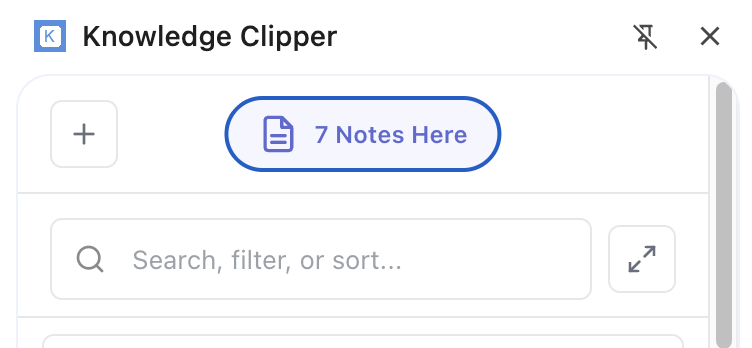
I killed the header pill and moved everything into "Stack" chips, which became a single source of truth for context. I used semantic search for suggestion pills instead. When viewing a page with no saved notes, we extract the page's title and text, generate embeddings, query the vector DB for similar notes, and then pull their tags.
The strategy:
- Stack is one state that drives both Library filtering AND chat context.
- Chips for everything: "This Page,"
#tags, "Starred," "Read Later". - AND logic: Stack filters + Search.
- Live context: changing filters updates the next chat message, but doesn't reset the conversation.
Users today treat classic chat UIs as a workspace. They want to bring new tools into the conversation, not start over.

Iteration 3: stack context bar
I refined the stack with a fixed 'This Page' button, a new pop-up context menu for more filters and sorting, and a scrollable horizontal bar. Tags appear as light grey chips in the Stack. Click one, and it becomes an active filter, surfacing the related notes you forgot you had.
If Stack is active and search returns nothing, we show a helper: "Searching in context. Search all notes?" One click clears Stack filters but keeps the search term.

What Shipped
Shipped v1.0.0 to the Chrome Web Store over the weekend.
Core features:
- Chrome side panel with Library + Chat views.
- Semantic search via vector embeddings, hybrid with keyword search through Orama.
- Basic note creation and editing tools.
- AI chat with smart context injection (Stack filters + "This Page" content).
- Smart metadata extraction (title, description, auto-tags from content).
- Ghost tags (semantic suggestions from similar notes).
- Linear-inspired design system (color tokens, spacing scales, full motion system).
- Local-first architecture (local embeddings; only chat hits OpenRouter).
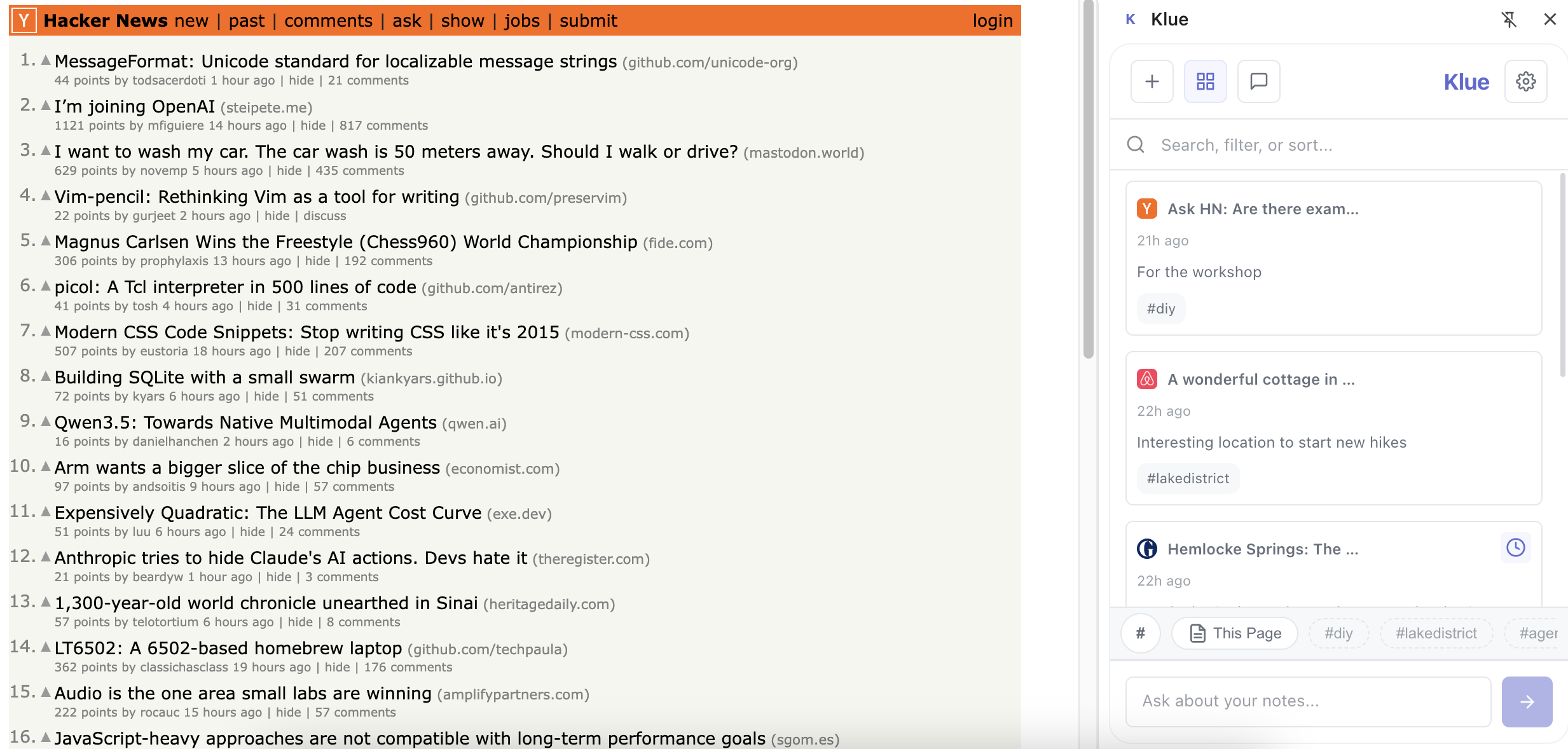
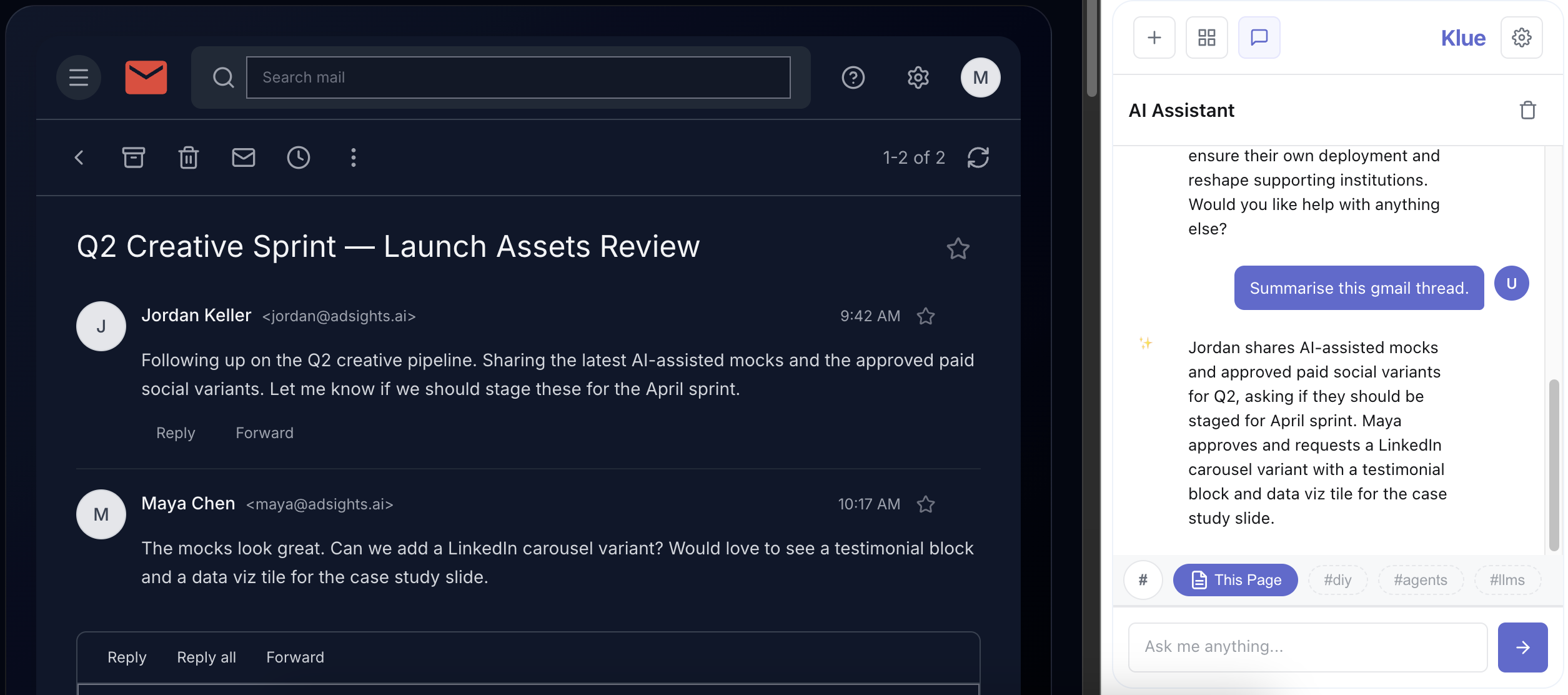
Is it perfect? No. The image handling is basic. The "This Page" filter sometimes gets confused on sites with complex URL parameters. Ghost tags occasionally suggest connections that make zero sense. But the core loop works. I can find that 2020 sub-primes note by typing "loans" into search. That's the thing I needed to work.
The tests:
- Deep Diver: can cite old notes without remembering exact keywords. ✓
- Hobby Programmer: solves problems from a personal solution library faster than re-Googling. ✓
- Avid Hiker: images and metadata save, but there's no gallery view yet. Partial.
I've been using it daily since shipping. That's the real test for me.
What's next?
A product shipped isn't a product launched. I still want to convince people to try this and bring their challenges. There's more feedback to capture from real users, and more testing to do to refine the experience. The first three personas were educated guesses. Now I'll have actual data.
If what I'm trying to build sounds interesting, give Klue a try on the Chrome Web Store.